

You’ve launched your event and now you want to know how well it’s performing.
This guide will help you check the total number of votes and how much you have earned so far. The steps are easy and quick.
What Are Total Votes and Earnings
Total votes is the number of all votes your contestants have received in that event.
Total earnings is the amount you have made from those votes based on the vote price you set.
For example, if your vote price is one hundred naira and your event has one hundred and fifty total votes, your total earnings will be fifteen thousand naira.
Now let’s walk through the steps.
Step 1: Tap the Menu and Go to My Events
Log in and tap the menu icon to open the full dashboard.
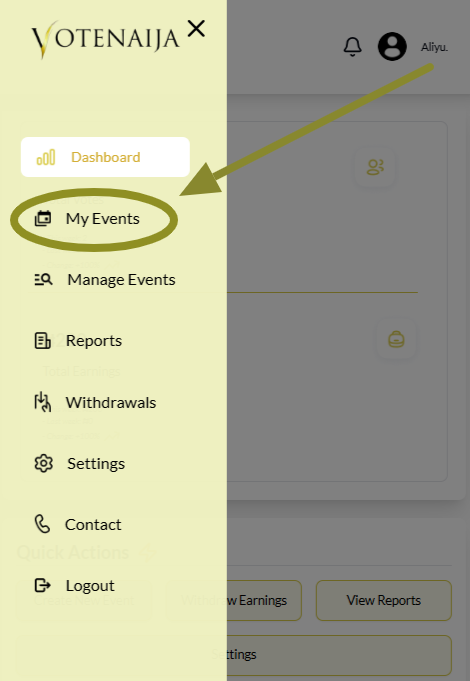
Tap on My Events to see the list of your events.
Step 2: Choose an Ongoing Event
Your events are shown in a list that includes both live and draft events.
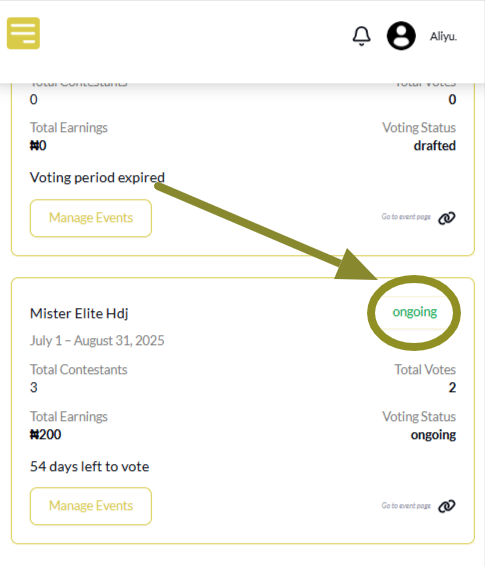
Focus on any event that is marked as ongoing.
Step 3: Check the Event Box
Each ongoing event has a small box showing the event name and other details.
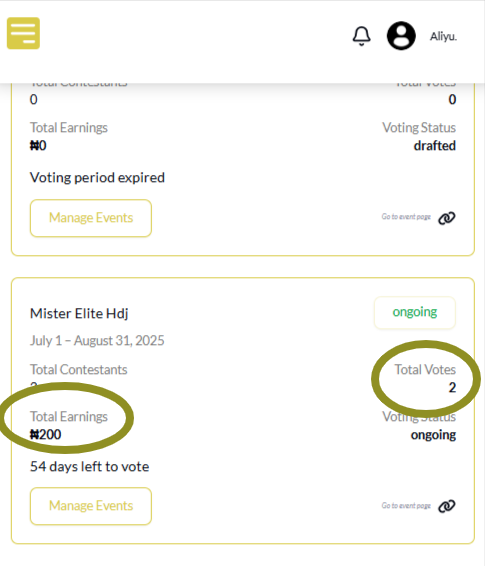
Inside this box, you will see total votes and total earnings. These numbers update automatically as people vote.
Wrapping Up
Knowing your votes and earnings helps you stay informed and know what next to do.
If you want more votes and higher earnings, try these tips
- Share your event link often so more people can see it
- Use a neat banner and clear contestant photos to make your event stand out
- Remind your contestants to promote their profiles and ask people to vote
- Adjust the end date if your event is doing well and you want to keep it going
Small efforts like these can bring big results. Keep an eye on your event and take action when needed.
Explore more features and tools with these easy VoteNaija guides.
- How to Print Your Event Report on VoteNaija (On Your Smartphone)
- Difference Between “My Events” and “Manage Events” Tabs (On Your Phone)
- Understanding Your Dashboard on VoteNaija (On Your Smartphone)
- How to Create a New Event on VoteNaija (On Your Smartphone)
- How to Avoid Auto Publishing Before You Finish Setting Up Your Event on Your Phone