

When you’re running a voting event on a desktop, every update needs to feel seamless to your audience.
If you decide to display or hide the rankings, you don’t want voters stuck refreshing their browsers or wondering what changed.
The good thing is that updates happen right away on PC screens, keeping the experience smooth and consistent. Let’s look at how it works step by step.
Step 1: Toggle the Setting in Your Dashboard
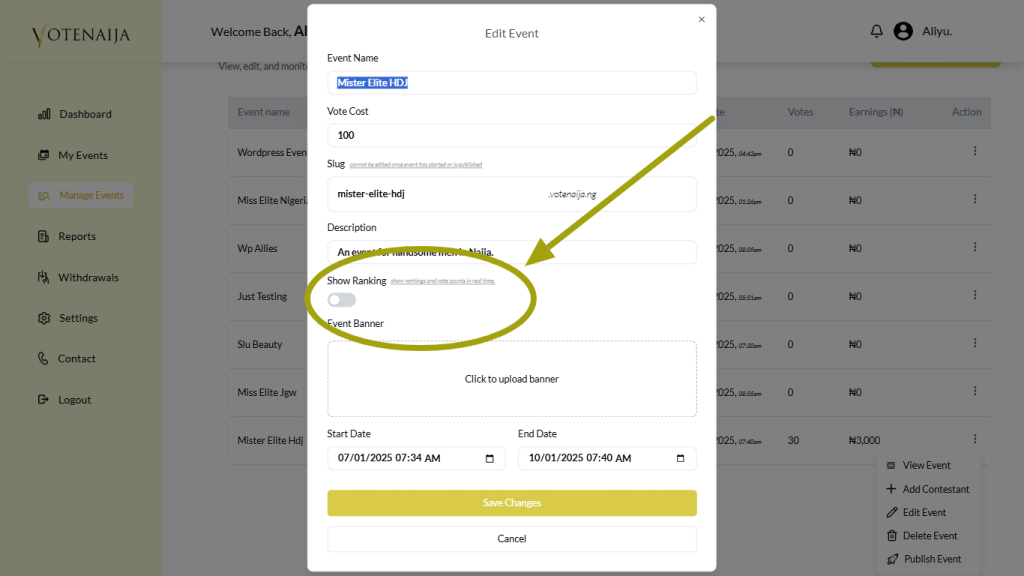
From your admin panel, you can turn the “Show Ranking” option on or off at any time. This gives you full flexibility—whether you want to highlight the top three contestants with their vote counts or keep things fairer by hiding the leaderboard.
Step 2: The Update Reflects Immediately

Once you make the switch, the change is instantly visible to all voters on their computers. There’s no lag or waiting period—the interface adjusts in real time.
If rankings are turned on, the top three contestants, along with their fire icons, appear in a special section. If rankings are turned off, that section disappears right away.
Step 3: No Browser Refresh Required
Users don’t have to refresh the page or reload their browser to see the new setup. The event page updates automatically, meaning voters can continue engaging without interruptions.
This smooth transition helps maintain momentum and avoids any confusion about what’s happening.
Step 4: Contestant Layout Adjusts Effortlessly
When rankings are hidden, all contestants remain listed under the “Meet Contestants” section with their individual vote counts.
When rankings are displayed, the top three are pulled up to the highlighted ranking area, while the rest stay in the usual section. The flow feels natural on a larger screen, just as it does on mobile.
Step 5: The Voting Experience Remains Steady
Even though the display changes, the actual voting system is unaffected. Every contestant continues to receive votes normally, and the system records them the same way.
The difference is purely in presentation, letting you control whether the competition feels suspenseful or celebratory.
Wrapping Up
So, do “Show Ranking” changes appear instantly to voters on a PC? Absolutely. With one quick action in your dashboard, the updates go live in real time without needing a refresh.
This ensures your event looks professional and runs smoothly, giving you the flexibility to shape how your audience experiences the competition.
Want more updates? Explore more on VoteNaija
- Understanding Your Dashboard: Votes, Earnings and Event Summary (On Your Computer)
- Difference Between “My Events” and “Manage Events” Tabs (OnYour PC)
- How to Track Event Performance from Your Dashboard (On a PC)
- How to Check Total Votes and Earnings for an Event (on a Computer)
- How to Print Your Event Report on VoteNaija (On Your PC)