

Using your smartphone to create an event on VoteNaija is not a problem at all. The platform is mobile-friendly, and everything you need is just a few taps away. You don’t need a laptop to get started.
Let’s walk through how to create your own event directly from your phone.
How to Set Up Your Event in 8 Simple Steps
Before we begin, make sure you’re logged into your VoteNaija account. You won’t be able to create or manage events if you’re not logged in.
Step 1: Go to the VoteNaija Dashboard

Visit the VoteNaija homepage using your mobile browser.
Tap the menu icon to open the side menu, then tap the Login button.
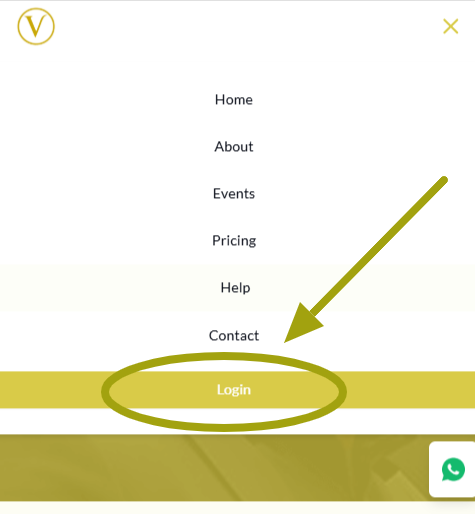
Once you log in successfully, you’ll be taken straight to your dashboard.
Step 2: Open the Dashboard Menu
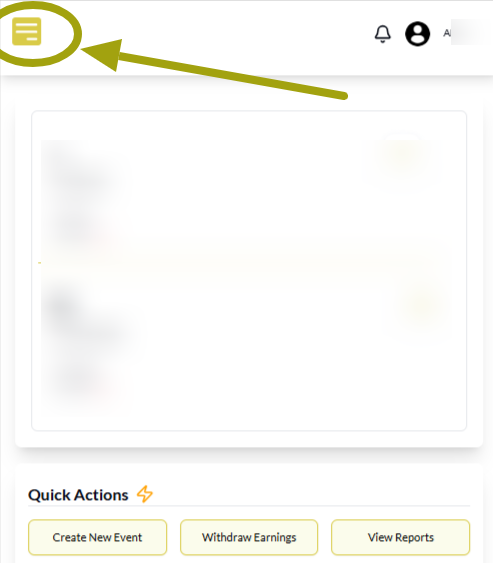
Now that you’re on the dashboard, tap the menu icon again to reveal all the available options.
Step 3: Tap on Manage Events

From the menu list, tap Manage Events.
This is where you’ll see a list of your previous events if you’ve created any.
If it’s your first time, the page will be empty and waiting for your first event.
Step 4: Click on Create New Event
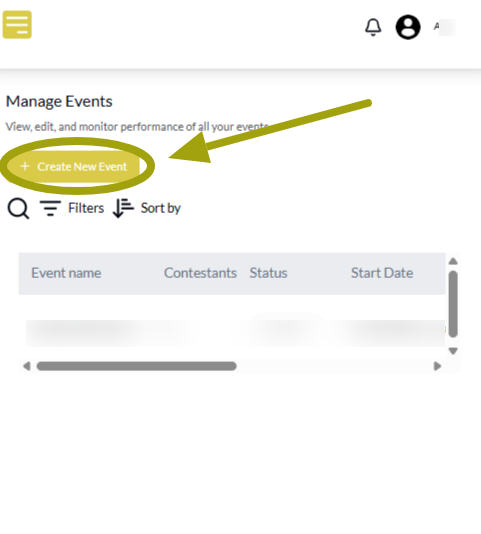
Tap the Create Event button.
This will open up a form where you’ll enter details about your event.
Step 5: Fill Out the Form
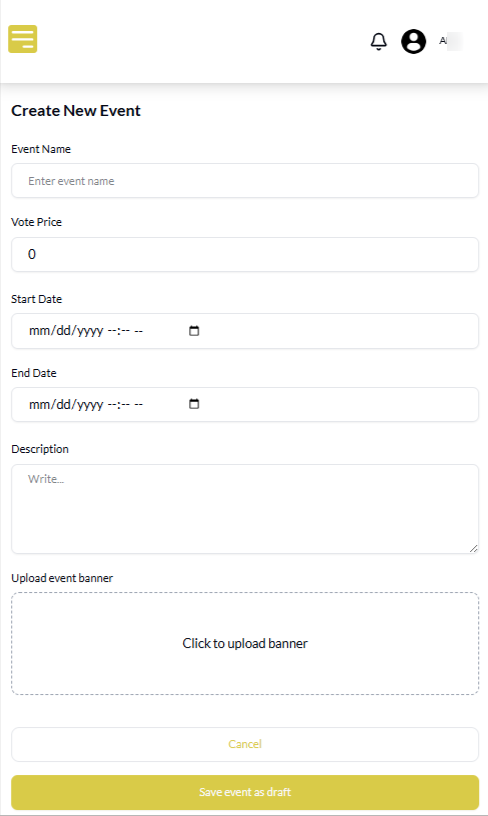
Here, you’ll be asked to provide:
- Event name
- Price per vote
- Start and end dates
- A short description of the event
- A banner image that represents the event
It’s best to create your event a few hours or a day before the actual start time.
Also, try to keep your vote price low to encourage more participation.
Step 6: Save the Event as Draft
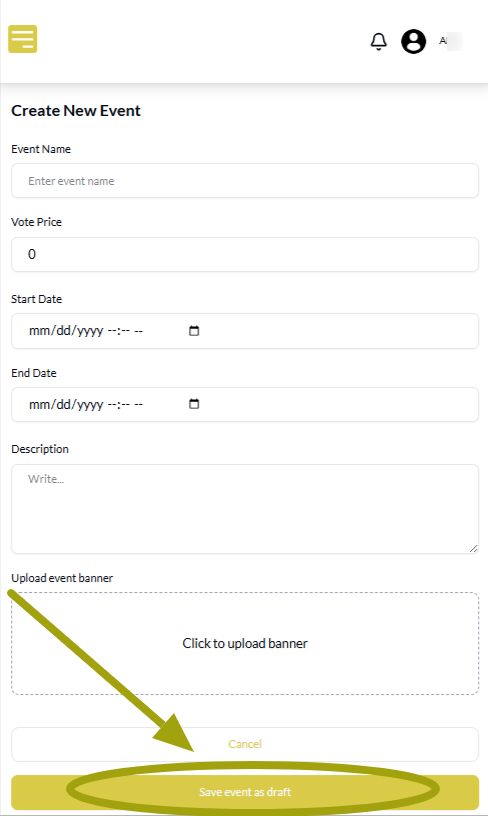
Once the form is complete, scroll down and tap Save as Draft.
At this stage, your event won’t go live yet because it needs contestants.
Pro Tip: For steps 7 and 8, you may need to scroll sideways through the events section, especially if your phone screen is small.
Step 7: Add Contestants

Right after saving, you’ll be prompted to add contestants.
If you’re ready, go ahead and add them immediately.
If not, you can return later. Just go back to Manage Events, tap the plus icon (+) and add your contestants one by one.
You must add at least two contestants before you can move on.
Step 8: Publish the Event

After adding the required number of contestants, return to the Manage Events page.
Tap the upward arrow (↑) icon next to your event to publish it.
And your event goes live.
All Set
That’s how to create a new event on VoteNaija using your smartphone.
Everything is right there on your screen, and you can create as many events as you want. So, what kind of event are you creating first?
Want to make the most of VoteNaija? These guides will walk you through it.
- Why You Can’t Edit an Event After It Goes Live (And What to Do Instead) – On a Phone
- How to Edit Event Details While It’s Still in Draft Mode (On Your Smartphone)
- How to Edit or Update an Ongoing Event on Your Phone
- Difference Between “My Events” and “Manage Events” Tabs (On Your Phone)
- Understanding Your Dashboard on VoteNaija (On Your Smartphone)