

You have made some money from your event and now you want to withdraw it.
The good part is, you can do that straight from your phone in just a few taps.
This guide will walk you through each step clearly so you do not miss anything.
Step 1: Log In and Go to Your Dashboard
Open your browser and visit the VoteNaija website.
Tap the Login button at the bottom of the menu.

Enter your details and you will be redirected to your dashboard once logged in.
Step 2: Tap the Menu and Go to Withdrawals
Look at the top of your screen and tap the menu icon.

From the menu, scroll and tap on Withdrawals.

This is where you can manage your earnings and request a payout.
If you have made withdrawals before, you will see the list of past requests here too.
Step 3: Enter the Amount You Want to Withdraw
On the Withdrawals page, you will see a text field.

Type in the amount you want to withdraw. The minimum you can withdraw is three thousand naira. If you enter anything below that, it will not work.
Step 4: Tap the Request Withdrawal Button

After typing the amount, scroll down and tap the Request Withdrawal button.
This tells the system that you want to withdraw that amount.
Step 5: Confirm the Withdrawal
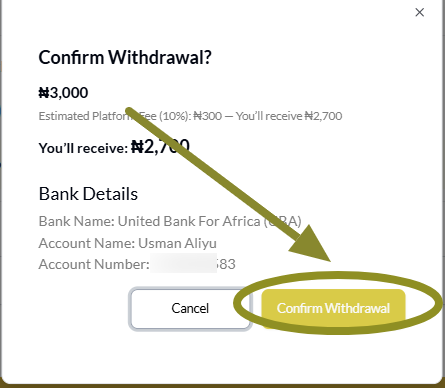
A small confirmation window will appear.
Tap the Confirm Withdrawal button to complete your request.
VoteNaija will now process the withdrawal. You will receive the money in your account shortly after.
Also remember, the platform takes ten percent from every withdrawal. So if you withdraw five thousand, you will get four thousand five hundred while five hundred goes to the platform as a service fee.
Wrapping Up
That is how you withdraw your earnings.
Just keep in mind that the minimum withdrawal amount is three thousand. Make sure you reach that before making a request.
Once you confirm, everything is handled for you. Your money will soon arrive in your account without stress.
Let these VoteNaija guides walk you through the key steps.
- How to Vote for a Contestant on VoteNaija Using Your Smartphone
- How to Print Your Event Report on VoteNaija (On Your Smartphone)
- How to Check Total Votes and Earnings for an Event (on a Phone)
- How to Track Event Performance from Your Dashboard (On a Smartphone)
- Difference Between “My Events” and “Manage Events” Tabs (On Your Phone)