

Running an online voting event comes with choices about how much information you want voters to see. One of the most important options is the ability to hide rankings.
On a computer screen, this changes the way your event page looks and how voters experience the contest. Let’s break it down step by step so you understand exactly what happens when you switch off rankings on your PC.
Step 1: You hide rankings from users
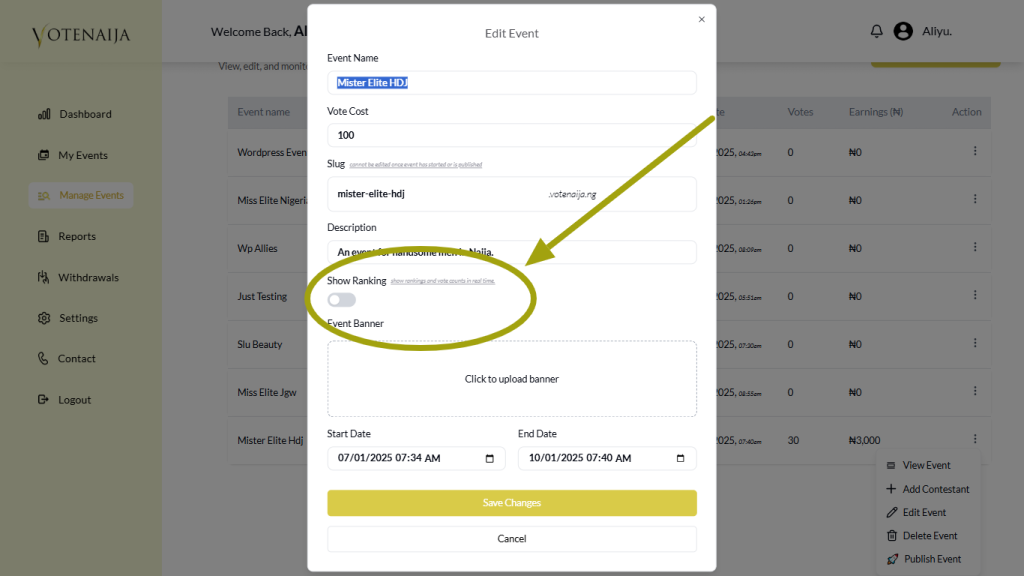
On your PC, you’ll find the Show Rankings toggle inside the event editing settings. Once you uncheck it and save, the event page instantly updates.
There’s no delay. Anyone visiting your event on a computer will see the difference right away. This first step is simply about changing the display setting. Votes and contestants remain untouched.
Step 2: The ranking section disappears
Normally, when rankings are enabled, the event page shows a dedicated section at the top with the top three contestants. Each one is displayed with their profile picture, vote total, and a small fire icon on the image to highlight them.
As soon as you hide rankings, this section disappears from the top of the page. On your PC screen, you’ll notice the event layout looks cleaner, with no spotlighted contestants at the beginning.
Step 3: All contestants appear under the Meet Contestants section

Once the ranking block is gone, all contestants move directly under the Meet Contestants section. On a PC, this usually shows as a grid of contestant boxes spread across the screen.
Every contestant gets equal space, with their picture, name, vote button, and vote count. Instead of separating a “top three,” everyone now appears together.
The order of contestants follows how they were added by the event organizer, not by votes. This gives every participant an equal chance to be noticed by voters scrolling on a larger display.
Step 4: Votes remain visible and update in real time
Even though rankings are hidden, voters on a PC still see vote totals under each contestant. These numbers continue to update live whenever someone casts a vote.
If you click the vote button, the counter adjusts instantly without needing to reload the page. The difference is that there is no ranking chart to show who is first, second, or third.
Voters would need to manually look through contestants to see the numbers, which keeps the contest transparent but less competitive in appearance.
Step 5: Winners are still decided by votes
Hiding rankings is purely a visual change. The system still records every vote in real time and calculates the final outcome based on totals.
On your PC, once the event ends, the admin dashboard shows the results in full. The winner remains the contestant with the highest number of votes, regardless of whether rankings were shown during the contest.
This means the process is still fair and accurate, the only change is that voters don’t see the “top three” spotlight throughout the event.
Wrapping up
On your PC, hiding rankings from voters changes how the event feels without affecting the actual results.
The ranking section disappears, contestants are listed equally under Meet Contestants, votes stay visible and live, and winners are still based on totals.
It’s a useful option when you want to reduce pressure on participants, avoid favoritism, or build suspense until the very end. With a simple toggle, you control the visibility of rankings and shape the voting experience to match your goals.
Don’t miss out, check more content directly on VoteNaija
- How to Edit or Update an Ongoing Event on a PC
- How to Edit Event Details While It’s Still in Draft Mode (On PC)
- Why You Can’t Edit an Event After It Goes Live ( And What to Do Instead) – on a PC
- Can I Still Add Contestants After the Event Starts? Here’s What to Know (on a PC)
- How to Avoid Auto-Publishing Before You Finish Setting Up Your Event (On Your PC)