

Sometimes you want your event to feel fairer, reduce pressure on contestants, or simply build suspense until the very end. That’s where the Hide Rankings feature comes in.
If you’re wondering what actually happens when you use it on your phone, let’s walk through it step by step. Each point explains exactly what changes on the event page and what voters will see.
Step 1: You hide rankings from users
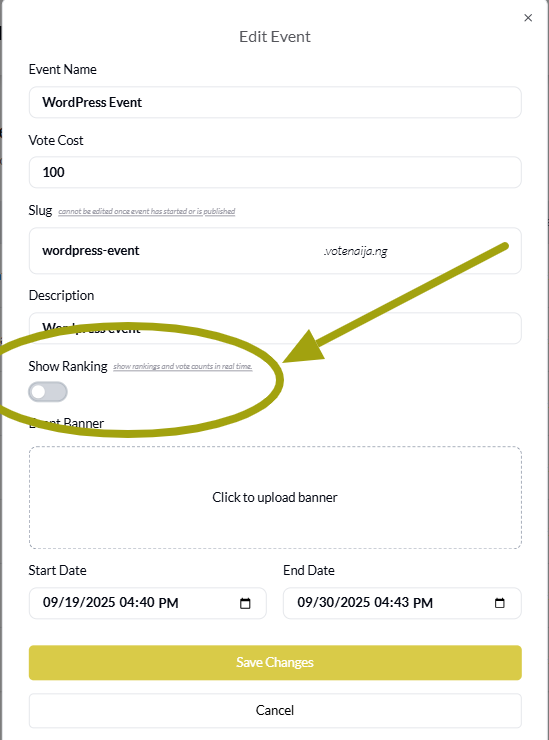
On your phone, head over to your event settings. There you’ll find the option to show or hide rankings. Once you tap to hide rankings and save, the system immediately updates your event page.
You don’t need to refresh anything manually. Your voters will see the change the next time they open the page. This first step is simply flipping the switch. It doesn’t change votes or contestants, only what is displayed to users.
Step 2: The ranking section disappears
The moment you hide rankings, the special ranking section at the top of the event page disappears. Normally, this section highlights the top three contestants with their photos and vote counts, giving them a spotlight. When you turn it off, that whole block vanishes.
On your phone, the page looks cleaner and simpler without that highlighted area. There is no more “Top 3” showcase, so voters won’t see who is currently leading in the contest.
Step 3: All contestants appear under the Meet Contestants section
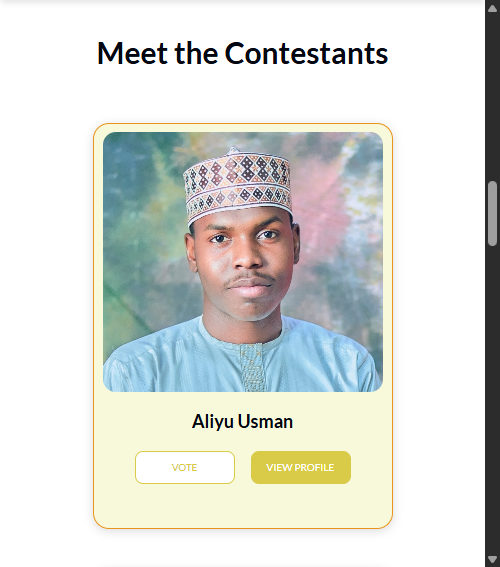
Without the ranking section, all contestants are placed directly under the Meet Contestants area. Here they are displayed in the order they were added, not in order of votes. On your phone, this looks like a scrollable list or grid where every contestant gets equal visibility.
Their profile photos, names, and vote buttons are shown just like before, but without the top-three badge or any rearrangement. This step is what really levels the playing field, because every contestant is simply “one of the contestants” instead of being spotlighted or hidden in the middle of the list.
Step 4: Votes remain visible and update in real time
Hiding rankings does not mean hiding vote numbers. Each contestant’s vote count is still shown right below their name, and these numbers continue to update in real time as people cast votes.
On your phone, you’ll notice that tapping the vote button instantly changes the number, so you always know that votes are being recorded. The difference is that voters can no longer compare who is first, second, or third at a glance.
They’d need to scan through and check manually. This keeps the event transparent while removing the competitive pressure of a ranking chart.
Step 5: Winners are still decided by votes
Finally, the most important thing to note is that hiding rankings does not change how winners are chosen. The system still counts every vote, and at the end of the contest, the winner is the contestant with the highest vote total.
On your phone, when the contest ends, the admin dashboard will reveal the full results as usual, even though voters never saw the top-three section during the event. This step makes it clear that hiding rankings is only a visual change. It does not affect the outcome or how votes are tallied.
Wrapping up
So, what happens when you hide rankings from voters on your phone? The process is simple: the ranking spotlight disappears, contestants are displayed equally under the Meet Contestants section, vote numbers remain live, and winners are still chosen based on totals.
It’s a way to keep the contest fair, reduce bias, and build suspense without changing the rules of the game. Whether you want to give every contestant equal visibility or surprise your audience at the end, the Hide Rankings feature helps you take full control of how your event feels.
Don’t miss out, check more content directly on VoteNaija
- How to Print Your Event Report on VoteNaija (On Your Smartphone)
- How to Check Total Votes and Earnings for an Event (on a Phone)
- How to Track Event Performance from Your Dashboard (On a Smartphone)
- Difference Between “My Events” and “Manage Events” Tabs (On Your Phone)
- Understanding Your Dashboard on VoteNaija (On Your Smartphone)