

Before you can make any withdrawal on VoteNaija, you need to enter your correct bank details. If one thing is wrong, your payout may fail or not even go through at all.
Let me show you what bank information you are expected to provide and how to fill each part correctly.
Your Account Name
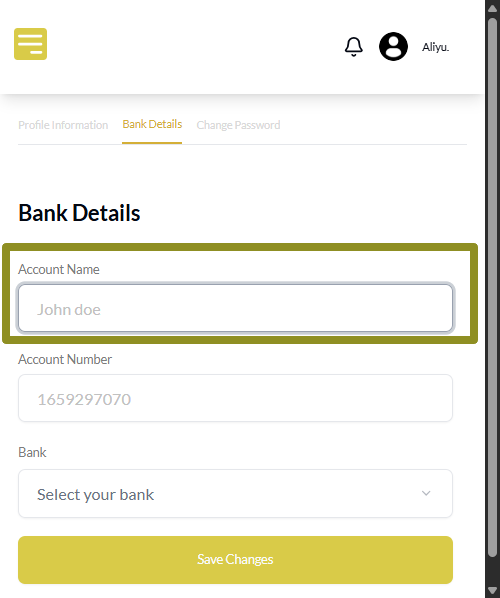
This is the full name on your bank account.
When typing it, make sure it matches exactly how your bank wrote it. If your bank puts your surname first, then type it that same way. Do not change the order or shorten anything.
The system checks if the name you provide matches your bank’s record. If it does not, the withdrawal may not be successful.
Your Account Number
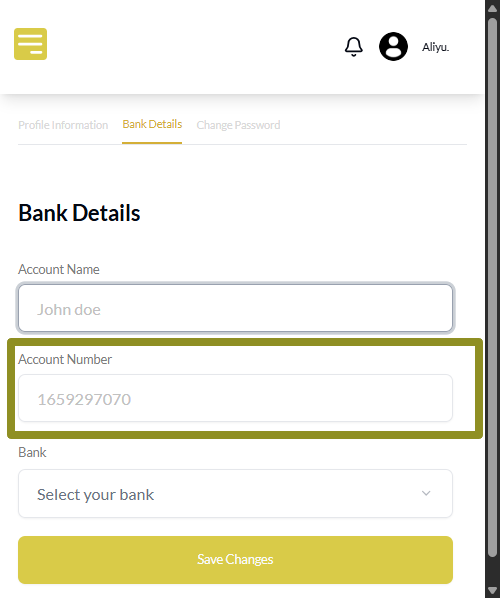
This is your ten digit account number. Take your time and enter it correctly.
Do not guess or copy from memory. It has to be ten digits and it must be for a real bank account or wallet account that can receive funds.
You can use regular banks or even wallets like Opay and Moniepoint.
Your Bank Name
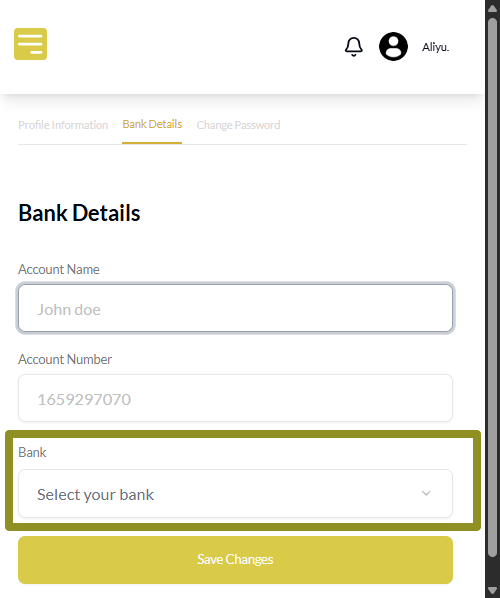
You will not type your bank name by hand. Instead, you will tap a dropdown and select your bank from the list. Scroll through the options and choose the one that matches your account number.
Make sure you pick the right one. If your bank does not match your account number, your payout may fail.
Final Words
When you are adding your bank details on your phone, the screen may look small, but the steps still matter a lot.
So go slowly. Check that the name matches your account name, that the number has ten digits, and that you selected the correct bank from the list.
Once those three are correct, your payouts will go through without stress.
These VoteNaija guides are here to make things clearer and easier.
- How to View Start and End Dates for Your Voting Event (On a Smartphone)
- Why Is My Withdrawal Not Working? (Bank Not Set Up Error) – On Your Smartphone
- How to Withdraw Your Earnings on VoteNaija (On Your Phone)
- How to Update Your Organizer Profile on VoteNaija (On Your Smartphone)
- How to Set Up Your Bank Details for Withdrawals (On Your Smartphone)